
A lot of immigration practices are already doing careful legal work while carrying a hidden security burden they didn't sign up for. Intake notes contain home addresses, family relationships, abuse histories, medical symptoms, and pending immigration status. Clinical evaluations add another layer: trauma narratives, diagnoses, medication history, and highly personal details that could expose a client to retaliation, stigma, or direct danger if mishandled.
That reality changes the standard conversation about cybersecurity. For an immigration law firm and its clinical partners, data breach prevention strategies aren't just about avoiding downtime or replacing hardware. They're part of client protection. When a file is exposed, the harm can reach far beyond the practice. It can affect testimony, family safety, and a person's willingness to seek help at all.
Table of Contents
- The Unique Risks in Immigration Client Data
- Build Your Foundation with a Practice-Specific Risk Assessment
- Fortify Your Digital File Cabinet with Access Controls and Encryption
- Scrutinize Your Supply Chain and Manage Vendor Risk
- Develop the Human Firewall Through Contextual Training
- Create an Actionable Incident Response Plan Before You Need It
- From Strategy to Standard Practice in Client Protection
The Unique Risks in Immigration Client Data
A client arrives for an evaluation after months of fear and instability. In one file, your office may hold a passport scan, a home address, declarations about persecution, medical history, trauma symptoms, police records, and information about children or partners. If that file is exposed, the harm can be immediate. A disclosure can reveal where a survivor is staying, expose a pending immigration case, or place highly sensitive clinical details into the wrong hands.
That mix of information creates a different security problem than a standard law office file or a routine medical chart. Immigration practices that work with asylum, T visa, U visa, VAWA, and hardship matters often sit at the intersection of legal ethics, HIPAA obligations, and personal safety. The question is not only whether a system is efficient. The question is whether it protects people whose status, family relationships, and trauma histories could be used against them.
In practice, the risk review has to focus on consequences. A leaked billing record is one problem. A leaked psychological evaluation tied to an immigration petition is another. Firms should assess risk according to the harm a disclosure could cause, including retaliation by an abuser, community stigma, witness intimidation, or damage to a client's legal position.
Practical rule: If a client would hesitate to disclose a fact unless they trusted your office completely, treat that fact as high-risk data.
That standard changes how a firm should look at its information. The case management platform is only part of the picture. Risk often sits in ordinary workflow points such as emailed drafts, scanned IDs saved on reception devices, staff text messages with interpreters, downloaded records on home laptops, and telehealth session notes or recordings. In my experience, these side channels create more exposure than the main system people spent time selecting.
Confidentiality also begins before any report is finalized. Clear informed consent procedures for psychological evaluations help define what will be collected, why it is needed, and who will receive it. That process does not replace technical safeguards, but it improves them. When a firm collects only what serves the legal and clinical purpose, it reduces avoidable exposure from the start.
Build Your Foundation with a Practice-Specific Risk Assessment
Security programs often fail for a simple reason. They start with tools instead of exposure. A law firm buys software, turns on a few settings, and assumes the basics are covered. Then someone discovers that a clinician downloads draft reports to a personal laptop, an attorney forwards records to a co-counsel account outside the approved system, and intake staff are using their phones to photograph identity documents because it's faster.
A practice-specific risk assessment fixes that. It turns broad advice into an inventory of your real workflow.
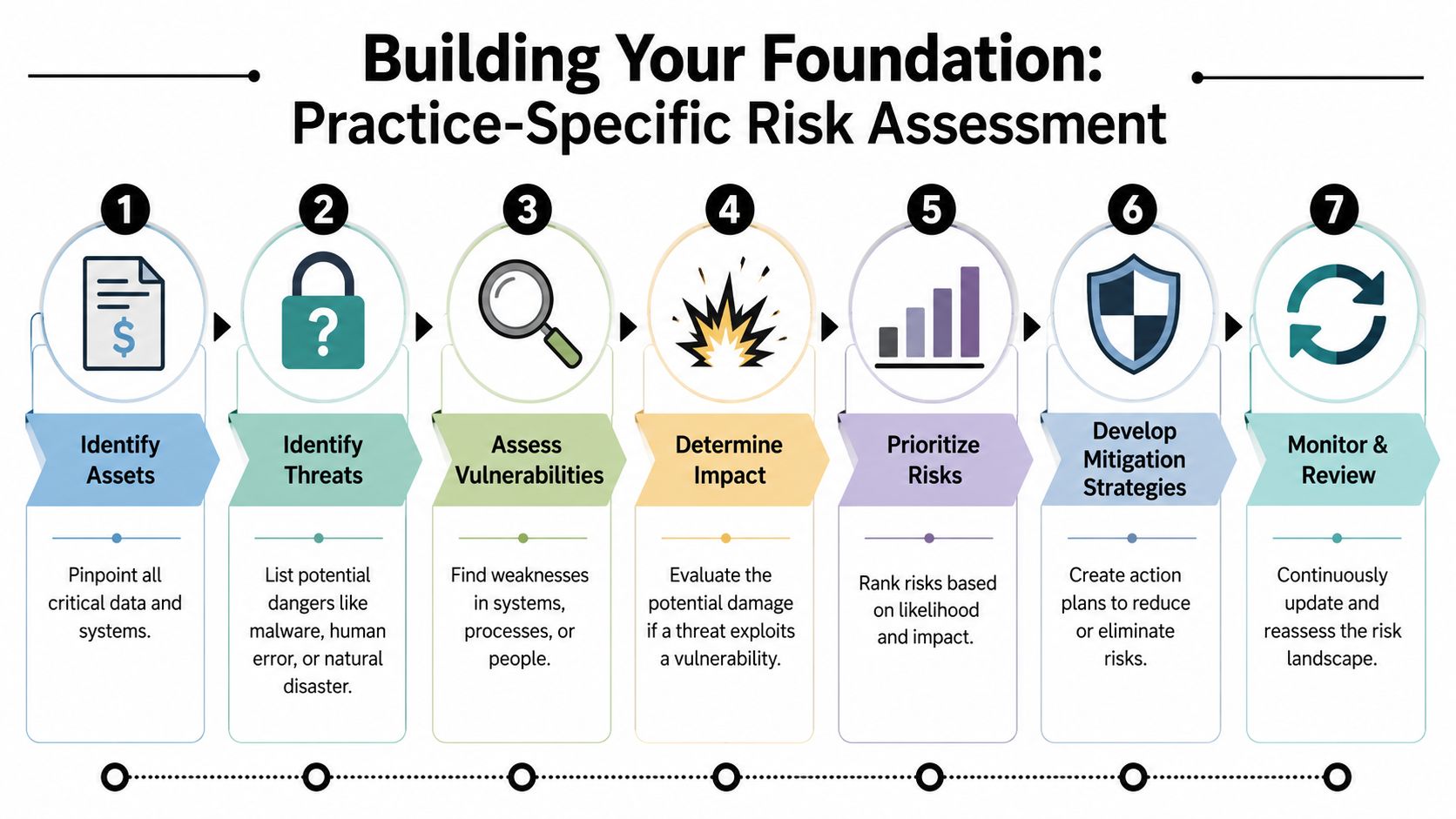
Start with the real file journey
Map one file from intake to final submission. Don't describe the policy. Describe what people do.
A workable sequence usually includes these checkpoints:
Intake collection
Note where names, dates of birth, addresses, declarations, and medical or trauma disclosures first enter the practice. That may be a website form, phone call, interpreter intake, referral email, or scanned paper packet.Storage points
Identify every place the file rests. Common examples include case management software, cloud drives, local downloads, laptops, email inboxes, print folders, and clinician note systems.Transmission paths
Track how the file moves. Email, client portals, e-fax, telehealth platforms, shared folders, USB drives, and messaging apps all create different risks.Access roles
List who can open what. Partners, associates, paralegals, intake coordinators, interpreters, contractors, and outside clinicians should not all see the same material by default.Retention and deletion
Document what remains after filing or case closure. Old exports, duplicate scans, and forgotten shared links often create the easiest opening for a breach.
Treat controls like locks on a cabinet
The digital file cabinet metaphor works because it keeps the discussion grounded. If a paper file contained an affidavit describing domestic violence and a clinical report documenting trauma symptoms, you wouldn't leave the cabinet unsecured in the lobby. Yet firms sometimes do the digital equivalent every day by relying on weak passwords, shared logins, and unrestricted folders.
The strongest baseline controls are essential because they address common entry points directly. Weak passwords remain the most prevalent single cause of data breaches, and strong authentication with employee security training is identified as a core prevention strategy in Fortinet's data breach overview. In practical terms, that means every account holding client data needs stronger login protection, software needs timely updates, and suspicious access needs to be monitored instead of noticed by accident.
Security should follow the file, not the office. If staff can work from court, home, or a clinic, your controls have to travel with them.
A concise risk assessment document should answer four questions:
| Question | What to document |
|---|---|
| What data matters most | Trauma narratives, evaluations, identity documents, contact details, immigration status, billing data |
| Where is it exposed | Email forwarding, personal devices, downloads, broad folder permissions, third-party apps |
| Who can reach it | Staff roles, outside partners, vendors, temporary users |
| What control closes the gap | MFA, encryption, restricted permissions, approved portal use, device management, training |
The best version of this document isn't polished. It's honest. If your team can't describe where the most sensitive records sit today, that uncertainty is the first risk to fix.
Fortify Your Digital File Cabinet with Access Controls and Encryption
A legal assistant opens a folder to pull one filing exhibit and ends up staring at a client's trauma history, prior medical records, and draft declaration. No hacker broke in. The system gave that user more than the job required. In an immigration practice that works with clinical evaluations, that kind of overexposure is not a minor workflow flaw. It creates ethics risk, privacy risk, and a real safety risk for clients whose status, location, or history could put them in danger if mishandled.
Once sensitive information is mapped, the next task is to control exposure and reduce the harm if files leave your custody. Access controls determine who can view, change, export, or delete records. Encryption protects the contents if a laptop is stolen, a cloud account is compromised, or a file is sent through the wrong channel.
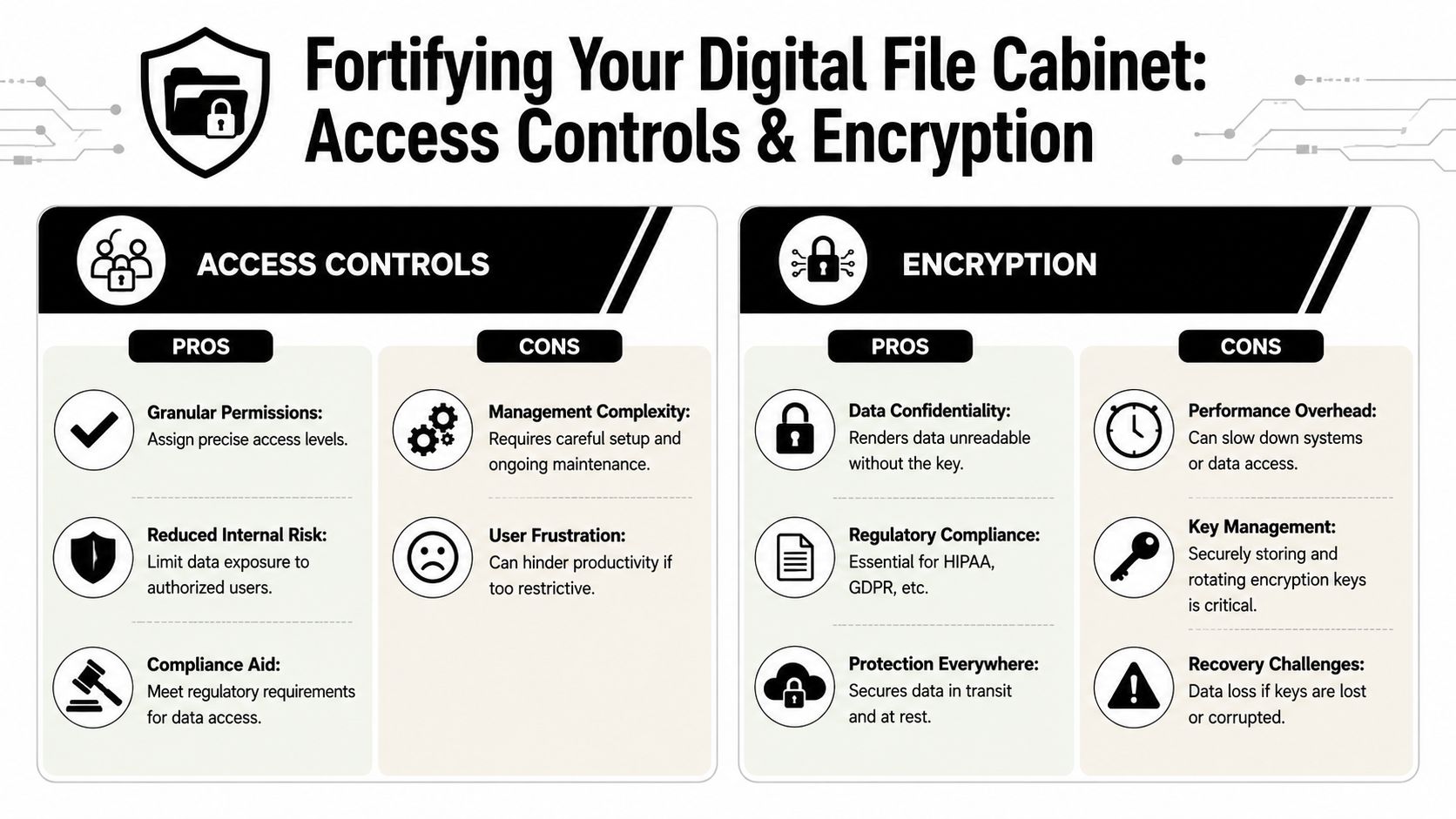
Access control is a clinical and legal safeguard
Broad access is often defended as practical. It keeps work moving until the wrong person opens the wrong file, a former contractor still has credentials, or a compromised email account reaches shared storage that was never segmented by role.
Least privilege is the safer default. Each person gets the minimum access needed for the task in front of them. A scheduler may need contact details and appointment status, but not the full evaluation. A paralegal may need the signed report, but not raw clinical notes, test materials, or internal draft language. An interpreter may need temporary access to a single meeting or document, then nothing at all.
Strong multi-factor authentication also belongs here, especially for accounts tied to case files, portals, and cloud storage. Passkeys or hardware tokens usually create more setup work than text-message codes. They also provide better protection for records that may contain protected health information, legal strategy, and details about a client's immigration status. That is a trade-off many firms should accept.
If your practice handles clinical records that may also trigger legal duties, your procedures should align with adjacent obligations around confidentiality and safety, including mandatory reporting requirements in clinical settings. Access design affects who sees information that may call for careful judgment, consultation, and documentation.
A useful access review asks four practical questions:
Does this role need the whole file, or only part of it?
Split access by function where possible. Demographics, scheduling, final reports, billing, and raw notes do not need to sit behind identical permissions.How long should access last?
Coverage assignments, contract projects, and expert collaborations should expire automatically unless someone renews them for a documented reason.What actions should this user be allowed to take?
Viewing, editing, downloading, sharing, and deleting create different levels of risk. Many firms miss this distinction.Will someone notice unusual behavior in time to respond?
Repeated failed logins, after-hours exports, and bulk downloads should trigger review, not sit unmonitored in an audit log no one checks.
A short technical explainer can help non-IT leaders evaluate these choices:
Encryption changes the consequences of theft
Encryption does one specific job. It makes data unreadable to anyone who does not have the key or authorized access.
That matters for data at rest and data in transit. In this setting, data at rest includes laptop drives, desktop workstations, cloud storage, archived backups, and portable devices used in court, clinics, or remote work. Data in transit includes portal uploads, email attachments, telehealth exchanges, file transfers between law firms and clinicians, and records moving between offices. If a mistake happens, properly encrypted data is far less useful to the person who gets it.
Use encryption to reduce the harm of ordinary mistakes. It does not prevent every incident, but it can keep a lost device or misdirected file from turning into readable client exposure.
The practical question is not whether encryption exists somewhere in your stack. The question is whether it is active in the places your team uses. A portal may encrypt uploaded files while a downloaded copy sits unencrypted on a personal laptop. Cloud storage may be encrypted by the vendor while exported reports are emailed without a secure method. Those gaps matter because immigration files often combine medical detail, identity documents, family information, and legal claims in one place.
Shadow IT creates access paths you did not approve
The cleanest permission map on paper can fall apart in one rushed afternoon. A staff member sends a draft through a personal file-sharing account because the approved system feels slow on mobile. A contractor drops notes into an unreviewed AI tool. Someone builds a tracking spreadsheet in a free app and pastes client identifiers into it so the team can "work faster."
These are not abstract IT problems. They are unauthorized disclosures waiting for the wrong recipient, weak settings, or a reused password. In an immigration matter, the exposed material may include trauma narratives, addresses, identity numbers, declarations, and medical observations that could harm the client far beyond embarrassment.
The strongest firms set a short list of approved tools, restrict downloads where appropriate, and make the safe path workable enough that staff will actually use it. If the secure option is too slow, too confusing, or unavailable on the devices people rely on, the policy will fail under deadline pressure.
Scrutinize Your Supply Chain and Manage Vendor Risk
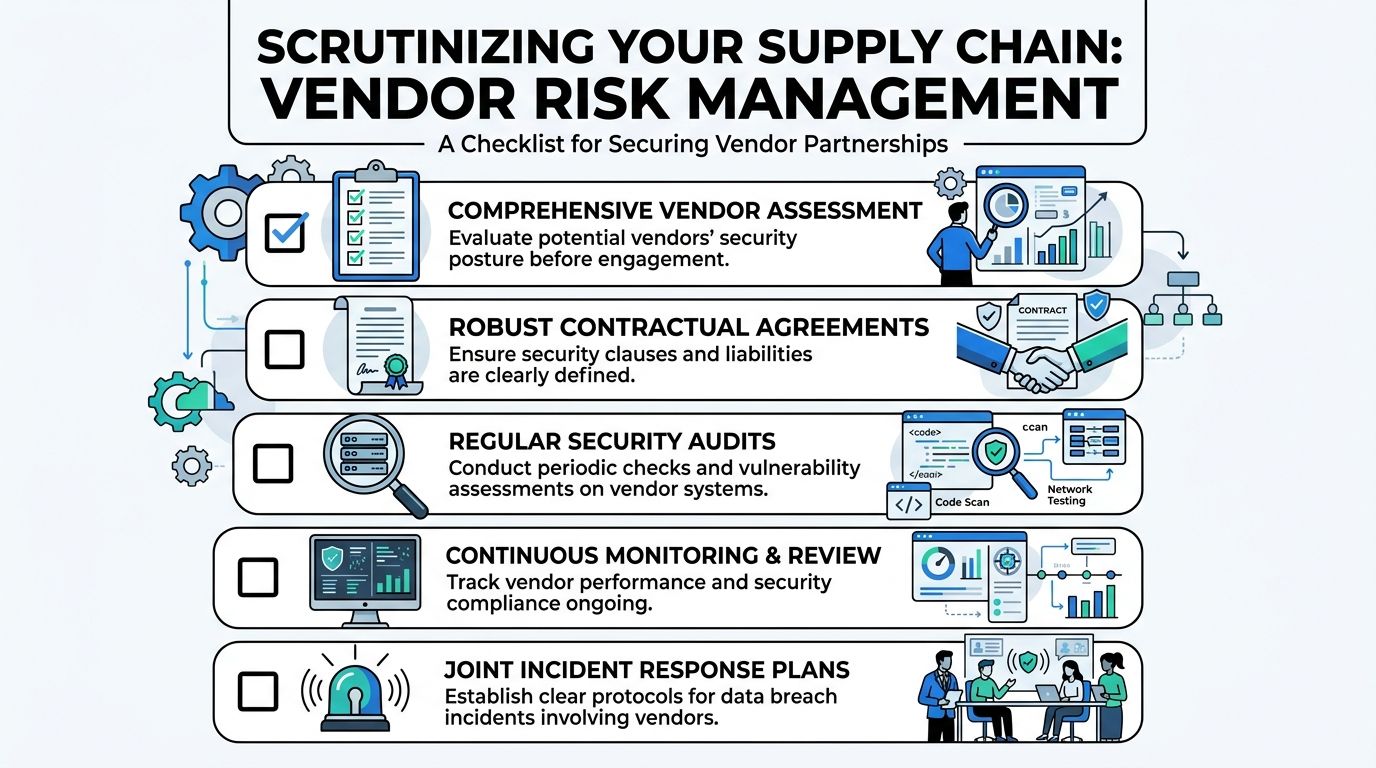
Most practices can picture the obvious systems that hold confidential data. They think about their case management platform, cloud storage, and email provider. The bigger blind spot is the extended chain around those tools: the telehealth vendor, the e-signature service, the transcription platform, the consultant with temporary file access, the IT contractor who can reset credentials, the intake chatbot on the website.
Those relationships deserve the same scrutiny you would apply to a new staff hire with direct file access.
A familiar scenario inside a busy practice
A paralegal is trying to meet a filing deadline. The secure portal is clunky on mobile, the client is anxious, and the clinician needs one missing document fast. Someone suggests a simpler route: "Just upload it to this app and send the link." No one means harm. No one is trying to violate policy. They are solving a workflow problem under pressure.
That moment is where vendor risk often enters the practice. The unapproved tool may store files longer than expected, allow broad link sharing, or create copies in locations the firm can't monitor. If the app was never reviewed, no one knows how it handles access logs, deletion, subcontractors, or backups.
Vendor risk often begins as convenience. The problem isn't bad intent. It's unmanaged access.
What vendor review should look like in practice
A solid vendor review doesn't need to become an enterprise procurement exercise. It does need to answer a few hard questions before client information moves.
Use a checklist that separates marketing promises from operational reality:
What data will this vendor receive or process
If the answer includes trauma histories, evaluations, identity documents, or legal strategy, the review should be strict.Can the vendor support HIPAA-aligned handling
That includes clear privacy terms, security documentation, and contracts that reflect the sensitivity of the data involved.How is access controlled
Ask whether the service supports role-based permissions, strong authentication, and auditable activity logs.What happens at the end of the relationship
You need a clean offboarding path. That means returning data, deleting residual copies where appropriate, and revoking all integrations.How will incidents be communicated
If the vendor has a problem, your practice shouldn't learn about it indirectly or too late to act.
For high-risk tools, ask for concrete documentation rather than verbal reassurance. Product demos are useful. Security posture is proven in contracts, settings, and support responses.
A practical vendor file should contain a short risk summary, the signed agreement, the approved use case, the internal owner responsible for it, and a review date. That last item matters. A vendor that looked acceptable at onboarding can become risky later if the product changes, staff start using new features, or the service expands into unapproved workflows.
Develop the Human Firewall Through Contextual Training
A receptionist gets a call late in the day. The caller knows a client's name, sounds distressed, and asks whether the client attended a trauma evaluation because "the court needs confirmation right now." If the staff member answers too quickly, the office may disclose protected clinical information, expose litigation strategy, and put a vulnerable client at risk.
That is why training in an immigration practice cannot be generic. Staff members make fast decisions under pressure, often while trying to be kind to frightened clients and families. The risk is not limited to clicking a bad link. It includes oversharing in conversation, sending records to an unverified address, or trusting a message that fits the facts of an active case.
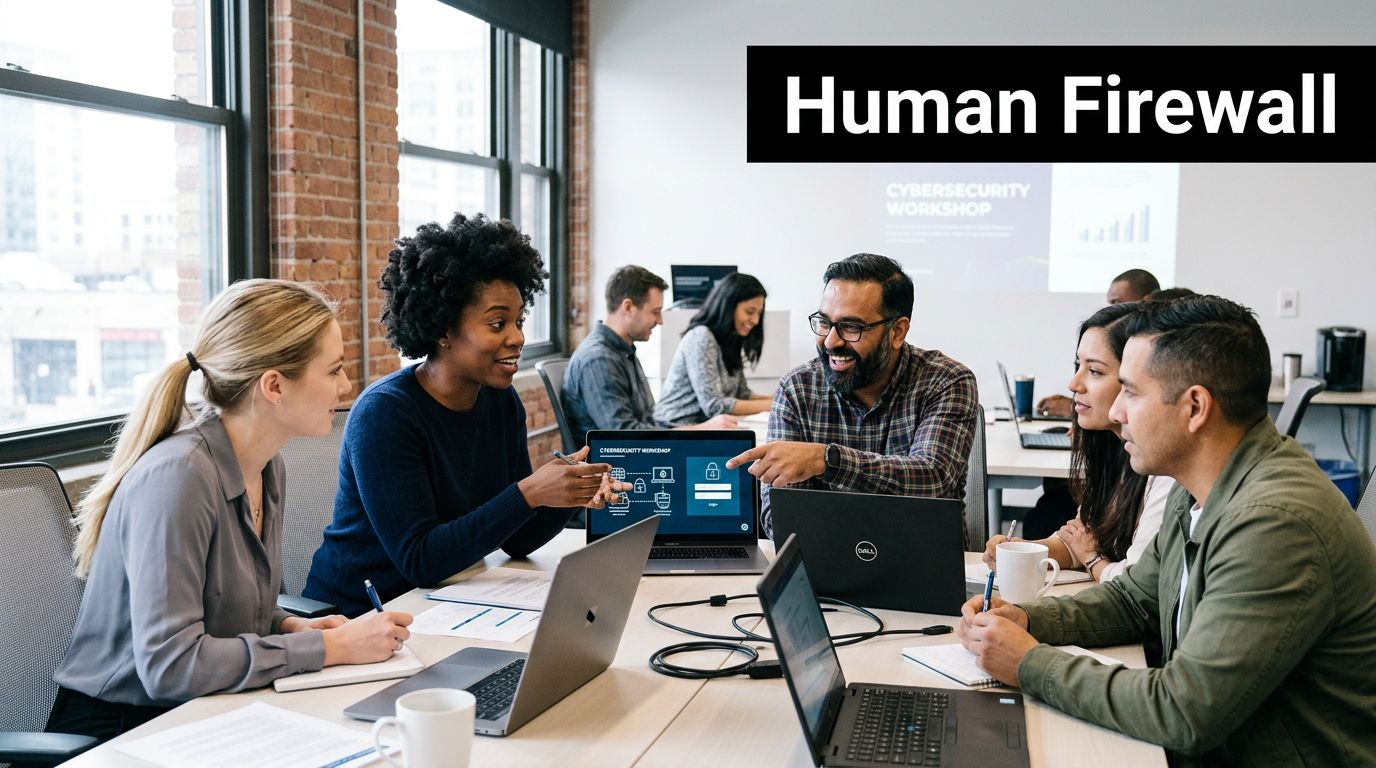
Train for the calls and messages your staff gets
Context matters. An immigration law firm handling clinical evaluations sees different pressure points than a general business office. Clients may be in detention, using borrowed phones, changing email addresses suddenly, or communicating through relatives, interpreters, or advocates. Those facts are real. They also create openings for social engineering.
Training works best when it reflects the situations your team faces at the front desk, in intake, and during case coordination. Short scenario drills are more useful than abstract warnings because they teach judgment, not just policy recall.
| Scenario | Safe response |
|---|---|
| A caller asks whether a spouse attended a trauma evaluation | Verify identity using approved procedures. Do not confirm attendance or share scheduling details casually. |
| An email requests immediate re-send of a report to a new address | Pause and verify through a known channel before transmitting anything. |
| A text claims to be from a client in detention asking for full records | Move the conversation into an approved workflow and confirm identity before disclosure. |
| A shared link appears to come from a clinician or co-counsel | Confirm the sender and the tool before opening or uploading documents. |
In this setting, privacy is tied to client safety. A mistaken disclosure may reveal a trauma history, an address, a detention status, or the existence of a legal claim to someone who should not have it. Staff training should say that plainly.
It should also address the tension between compassion and control. Good client service includes warmth, patience, and trust-building, especially with people who have survived violence or fear government contact. Strong rapport with vulnerable clients still requires identity checks, approved communication channels, and clear explanations of why the office cannot release information on demand.
Build a response habit before a crisis
Under stress, staff need a script they can use in ten seconds.
Use short internal rules such as:
Stop the transfer
If something feels off, do not send the file.Verify on a second channel
Use a known phone number or an existing thread, not the contact information in the suspicious message.Report quickly without blame
Staff should know exactly where to forward suspicious emails, screenshots, or voicemails.Escalate unusual requests for records
Requests involving minors, family members, alleged emergencies, or changed contact details need extra review.
I have seen practices improve quickly when they stop treating privacy training as an annual compliance task and start treating it as case protection. A five-minute discussion in a weekly meeting about one realistic scenario can change behavior faster than a long slide deck.
The safest teams are not the teams that never hesitate. They are the teams that pause, verify, and ask for help before protected information leaves the office.
Create an Actionable Incident Response Plan Before You Need It
At 7:40 a.m., a clinician cannot open the scheduling system, a paralegal reports a strange login alert, and someone realizes a case file containing a trauma narrative was emailed to the wrong recipient the night before. In an immigration practice, that is not only an IT problem. It can affect client safety, legal strategy, and the client's willingness to keep disclosing painful facts.
A written incident response plan gives the firm a way to act quickly without guessing. The first goal is containment. The second is preserving enough evidence to understand what happened and meet any legal or ethical duties that follow. For firms handling psychological evaluations, medical details, and immigration records, that sequence matters because delay can widen the exposure while staff are still trying to piece together the full story.
Act in the first hour
The first hour should answer a practical question: what must the team do now to stop more information from leaving the practice?
A workable checklist includes:
Secure the affected account, device, or system
Disable access, force password resets where appropriate, revoke active sessions, and isolate compromised devices.Preserve evidence
Keep suspicious emails, logs, screenshots, timestamps, and user reports. Avoid quick fixes that erase useful records.Identify what may be exposed
Confirm whether the incident involves client identifiers, trauma histories, evaluation reports, billing records, signed releases, or attorney work product.Notify the response team
Include firm leadership, IT support, the privacy lead or compliance contact, and the attorney with authority to make client-facing decisions.Use one controlled communication channel
Staff need a single internal place for updates so instructions stay consistent and facts do not get distorted.
Names matter more than titles in a crisis. "Managing attorney" is less useful than a line in the plan that states who answers after-hours calls, who can authorize outside forensic support, and who decides whether to pause access to a shared drive.
Build the plan around your actual cases
Generic breach templates often miss the realities of immigration work. A file may contain a home address that must stay hidden from an abuser, details of past persecution, a pending legal strategy, and a clinical opinion tied to an asylum or VAWA case. If that information is exposed, the harm is not limited to inconvenience or regulatory risk.
The plan should account for those case-specific consequences in advance. Staff should know how to triage incidents involving minors, separated family members, detained clients, interpreters, or third-party records from hospitals and shelters. The plan should also distinguish between a routine security event and one that could change how the firm communicates with a client because phone, email, or physical mail may no longer be safe.
Client notification requires judgment, not a canned script
If an incident affects protected health information, legal files, or both, the response may trigger duties under HIPAA, contract terms, state breach laws, malpractice coverage requirements, and professional responsibility rules. That analysis should not begin from scratch during the event.
Write out the decision points now:
Who assesses whether notice is required
Assign the person or small group that evaluates legal, regulatory, insurance, and ethical obligations.What the client message must cover
Prepare plain-language templates that explain what happened, what information was involved, what the firm has done, and how the client can communicate safely next.How the practice continues operating
Document how hearings, filings, consultations, and scheduled evaluations will proceed if email, document storage, or phones are limited.What must change after the incident
Every confirmed incident and every close call should produce a specific fix, such as a revised workflow, narrower access, or a vendor change.
This is also a trust issue. Clients who have survived violence, government abuse, trafficking, or family coercion often read confusion as danger. A calm, accurate response protects the record and helps preserve the therapeutic and legal relationship.
Rehearse before you need it
A plan that lives in a folder and has never been tested will fail in small, avoidable ways. Contact numbers will be outdated. Authority lines will be unclear. Someone will assume the vendor is handling a task that the firm still owns.
Run a short tabletop exercise twice a year. Use scenarios that fit the practice: a stolen laptop after an asylum interview, a compromised email account used to request evaluation records, or a cloud vendor alert involving shared client documents. These drills do not need to be elaborate. They need to show whether the people in the room can make sound decisions under pressure, protect vulnerable clients, and keep the case moving while the incident is being contained.
A good incident response plan protects more than systems. It protects clients whose histories and legal status can be harmed by a careless or delayed response.
From Strategy to Standard Practice in Client Protection
The strongest data breach prevention strategies become ordinary habits. Staff use approved channels because that's how the office works. Access stays narrow because managers review it routinely. Vendors are vetted before adoption, not after a problem. Training reflects authentic requests and manipulations that immigration teams face. Incident response lives in a document people can practically follow.
That is the right standard for practices handling trauma histories, legal status information, and clinical evidence. The file isn't just data. It is often the written record of why a client needs protection from the immigration system, the court, or an abuser.
When security becomes part of daily operations, it supports both compliance and credibility. It protects the client, the record, and the integrity of the case. For immigration attorneys and their clinical partners, that isn't a side task. It's part of competent representation and ethical care.
If your firm needs immigration psychological evaluations that match this level of confidentiality and care, Pro Psychological Analysis works with attorneys nationwide to provide HIPAA-conscious, evidence-based evaluations for asylum, VAWA, T visa, U visa, and hardship cases. Their team combines clinical rigor with reliable collaboration, helping you protect sensitive client information while building stronger immigration filings.