
You're probably handling some version of this right now. A client completes an intake on a phone, sends identity documents by email, attends a remote psychological evaluation from a shared apartment, and expects the final report to move quickly to counsel for filing. At every step, the file contains the kind of information that can damage a person's safety, credibility, or case if it leaks, changes hands carelessly, or can't be authenticated later.
Generic IT advice doesn't solve that problem. Immigration practice sits at the intersection of trauma disclosure, legal strategy, medical privacy, and evidentiary scrutiny. Secure data management in this setting has to do more than block unauthorized access. It has to preserve confidentiality, support ethical practice, and create a record of handling that remains defensible if USCIS, opposing counsel, or the court asks how the information was obtained, stored, shared, and protected.
That need has become more urgent, not less. Public guidance still leaves major gaps for high-risk environments. One review found that over 80% of guides omit implementation frameworks for HIPAA-aligned access minimization in legal services, despite evidence that restricted access plays a critical role in breach prevention and compliance, as discussed in this analysis of access minimization gaps in high-risk environments. For immigration lawyers and clinicians, that omission is where preventable risk starts.
Table of Contents
- Building Your Defensible Data Management Policy
- Implementing Access Controls and Encryption
- Securing Data Transmission for Telehealth and File Sharing
- Managing the Data Lifecycle from Creation to Destruction
- Preparing Your Team and Responding to a Breach
- Documenting Security for Court and USCIS Admissibility
Building Your Defensible Data Management Policy
A defensible policy starts with a hard truth. A standard office privacy template won't protect an immigration practice that handles trauma narratives, protected health information, declarations, country condition exhibits, interpreter communications, and attorney work product inside the same matter.
A strong policy distinguishes what the data is, why you hold it, and who may touch it at each stage. That matters because immigration files often contain mixed categories of sensitivity. A passport scan, therapy notes, a VAWA narrative, and a draft expert report shouldn't travel under the same assumptions, even if they sit inside one client folder.
Why generic policies fail
Most generic policies focus on broad permissions and password hygiene. They usually don't address the specific collision between HIPAA duties, attorney-client privilege, work-product protection, and the practical realities of remote intake. That leaves staff making judgment calls on the fly, which is exactly what you want to eliminate.
Practical rule: If a staff member has to guess whether they may open, send, print, or summarize a file, the policy is incomplete.
The policy should define data classes in plain language. One useful structure is:
| Data class | Typical immigration example | Handling standard |
|---|---|---|
| Administrative | scheduling, billing, contact details | limited office access |
| Legal sensitive | declarations, affidavits, filing drafts | matter-team only |
| Clinical sensitive | symptom history, diagnoses, therapy notes, testing | clinical team and designated attorney only |
| Extreme-risk disclosures | abuse details, trafficking history, location-sensitive safety facts | named individuals only, no default sharing |
That table isn't just operational. It helps you show deliberate minimization if your handling is ever questioned.
Clauses that belong in the file handling policy
Every defensible secure data management policy in this context should answer six questions.
- Purpose limitation. State why each data class is collected and who uses it. Don't collect “just in case” material if it won't support care, evaluation, or legal filing.
- Access limitation. Specify named roles. For example, intake staff may gather logistics but shouldn't view raw clinical narratives unless their task requires it.
- Transmission rules. Define which channels are approved for intake forms, signed consents, interpreter coordination, draft reports, and final reports.
- Retention and closure. State what happens when representation ends, the report is filed, or a matter becomes inactive.
- Incident escalation. Require immediate internal reporting for misdirected emails, lost devices, suspicious logins, or unauthorized downloads.
- Documentation duty. Require staff to record material disclosures, corrections, and deviations from normal workflow.
Include a short appendix with operational examples. Staff remember scenarios more reliably than abstract rules.
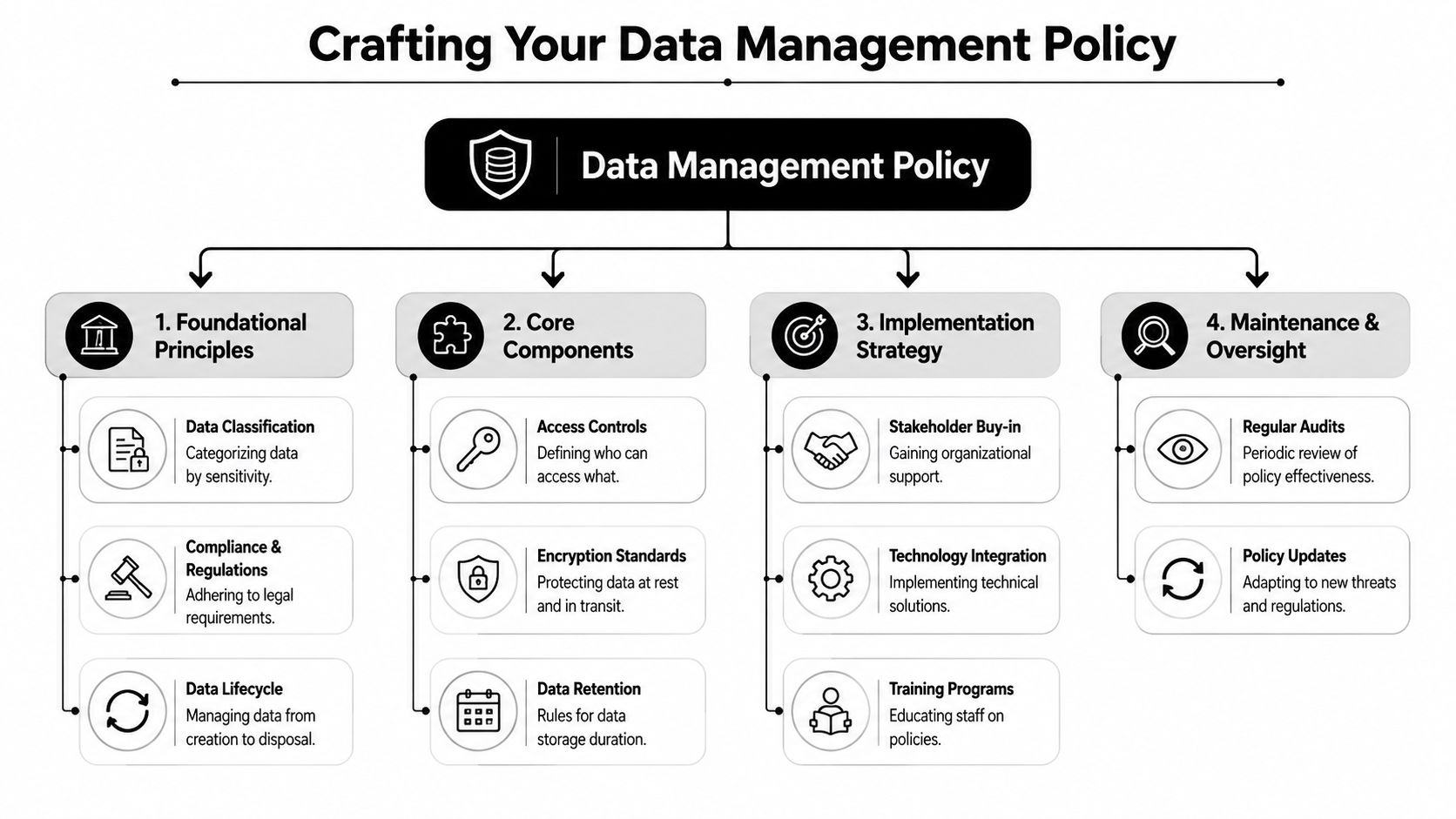
One more point is easy to miss. The policy should be written as if a skeptical third party may read it later. That changes the tone and the level of precision. Instead of saying “we protect client data,” say what the office does, who approves exceptions, where logs are kept, and how disclosures are documented. A policy becomes useful when it guides daily behavior and doubles as evidence of due care.
Implementing Access Controls and Encryption
Most confidentiality failures in legal and clinical work aren't dramatic hacks. They're ordinary overexposure. An assistant can see therapy notes because a folder inherited broad permissions. A contractor downloads more than needed. A stolen laptop contains locally synced files. Access control and encryption solve those problems when they're implemented with discipline.
Map access by function, not by job title alone
Role-based access control sounds technical, but the legal analogy is simple. Not everyone who works on a matter gets the whole file cabinet key. They get the drawer they need.
In practice, that means building permissions around tasks. A scheduler may need appointment status and contact methods. A paralegal may need declarations, filing deadlines, and final reports. A clinician may need interview materials and prior treatment records. The lead attorney may need access across legal and clinical material for strategy and filing decisions.
Use a matrix before you touch software settings.
| Function | Needs scheduling data | Needs legal draft access | Needs clinical raw notes | Needs final report |
|---|---|---|---|---|
| Intake coordinator | yes | no | no | no |
| Paralegal | limited | yes | no | yes |
| Clinician | yes, limited | no | yes | yes |
| Lead attorney | yes, limited | yes | limited by necessity | yes |
That exercise exposes where firms usually overgrant access. Shared inboxes and shared drives often blur these distinctions. If you want practical ways to reduce exposure paths, this guide on data breach prevention strategies for operational teams is a helpful companion to the permission model.
Choose encryption that works when devices leave the office
Encryption is the digital version of a locked evidence cabinet. It matters in two places. At rest, when files sit on a laptop, cloud platform, or server. In transit, when files move between people or systems.
What works in firms handling immigration records is usually not exotic. It's careful selection and consistent configuration of familiar tools:
- Microsoft 365 with role-based permissions and encrypted storage can work well when folders are segmented by matter and sensitivity.
- Google Workspace can also support controlled sharing, but only if external sharing rules, download limits, and account access are tightly set.
- Dropbox Business or similar file-sharing platforms can be acceptable for controlled exchange when permissions, expiration settings, and audit logs are enabled.
- Case management systems such as Clio or MyCase can reduce sprawl if teams stop duplicating documents across email, desktop folders, and messaging apps.
The strongest technical setup still fails if staff export files to personal devices or send “just this once” attachments outside the approved channel.
One trade-off deserves explicit attention. More restrictive controls can slow workflow. That's real. But broad access creates silent risk that only becomes visible after a disclosure mistake. In forensic and clinical legal work, slower and documented is usually safer than fast and informal.
Securing Data Transmission for Telehealth and File Sharing
Remote work creates a very specific problem. The record is most vulnerable while moving. Intake forms travel from phone to portal. Identity documents move from scanner to cloud storage. A clinician conducts a telehealth interview. A final report goes to counsel. Every handoff creates a chance for interception, misdirection, or later challenge about authenticity.
The public guidance is thin where decentralized practice is concerned. Only 12% of public guides offer integrated workflows for decentralized teams, even though 65% of small businesses face data loss due to fragmented usage, according to this discussion of fragmented data practices and decentralized workflows. Immigration practices feel that fragmentation acutely because legal, clinical, and administrative staff often work across devices and locations.
A remote evaluation workflow that holds up under scrutiny
Take a common scenario. A client is scheduled for a psychological evaluation supporting an asylum or VAWA matter. The client completes informed consent remotely, uploads identity documents, attends a video session, and authorizes release of the report to counsel.
That sequence should look like this:
- Onboarding occurs in a secure portal, not by ordinary email. The client receives instructions in plain language, including privacy limits, device recommendations, and what to do if they lose connection. For consent language that aligns process with documentation, PPA's overview of informed consent procedures in immigration evaluations is useful.
- Identity verification is documented before substantive disclosure. Staff confirm identity through the approved process and note date, method, and who performed the check.
- The telehealth session uses a platform configured for confidential sessions. Waiting room enabled, session access restricted, recording disabled unless specifically authorized and documented.
- The clinician completes notes directly into the designated record system or moves them there promptly after the session. Temporary local storage should be minimized.
- The final report moves to counsel through a controlled file-sharing channel with access limited to the receiving legal team.
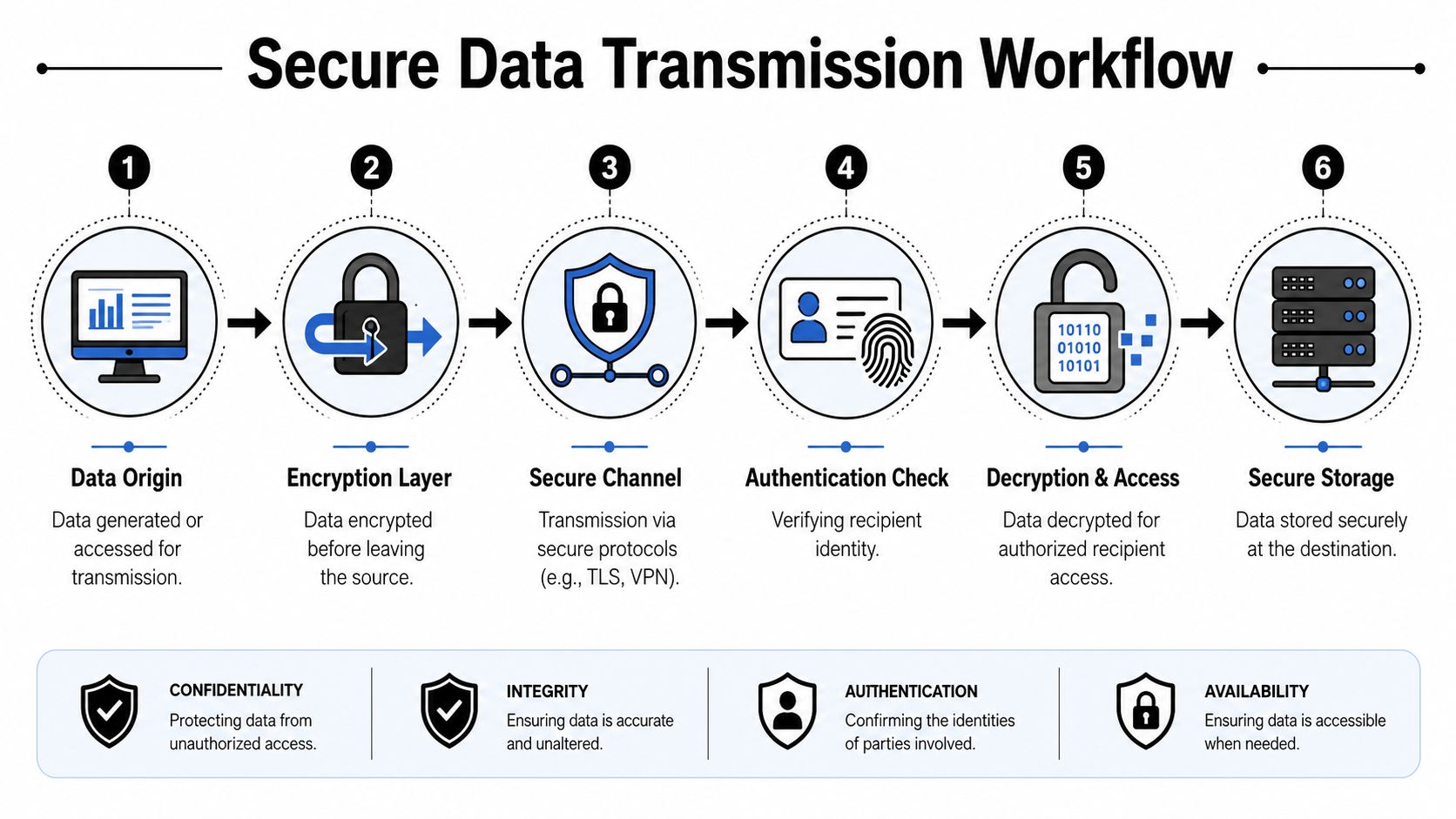
The workflow matters because convenience tools create evidentiary vulnerabilities. If the report was sent through an unsecured path, downloaded to unmanaged devices, or circulated through personal accounts, you may later spend time defending the handling process instead of the merits of the report.
What breaks confidentiality in practice
The weak points are rarely subtle. They're usually habits.
- Email attachments without controlled access. Once sent, they're hard to retract and easy to forward.
- Text messaging for substantive disclosures. It encourages piecemeal communication and poor record capture.
- Shared family devices. Clients may use them out of necessity, which means your intake instructions should tell them how to protect privacy before the session begins.
- Local desktop downloads. Staff often forget what remains on a machine after a transfer is complete.
A better approach is to treat transmission as part of chain of custody. Every important transfer should answer four questions: who sent it, through what system, to whom, and under what authorization.
If a file transfer can't be reconstructed later from logs, permissions, and notes, it wasn't controlled well enough for sensitive immigration evidence.
That standard isn't excessive. It's practical. Telehealth and virtual case preparation can be safe, but only when transmission is treated as a governed process rather than an informal convenience.
Managing the Data Lifecycle from Creation to Destruction
Secure data management begins before the first upload and continues after the case closes. That lifecycle perspective matters in immigration work because records often contain both legal and clinical material, and those materials don't always follow the same operational rhythm.
A clean lifecycle reduces two forms of risk at once. First, it prevents unnecessary accumulation of sensitive material. Second, it preserves the integrity of records that do need to remain available for filing, follow-up, supervision, or lawful disclosure.
Create records with retention in mind
The strongest systems start by limiting what enters the file. Intake forms should gather information necessary for representation, evaluation, and scheduling. Teams create risk when they ask for broad narrative disclosures too early, before consent, role assignment, and storage location are settled.
Use this working checklist:
- Create in the system of record. Don't draft in scattered notes apps or personal devices if the final destination is a secure case or clinical platform.
- Separate raw material from finalized work product. Draft notes, interpreter coordination, declarations, and final reports shouldn't collapse into one undifferentiated folder.
- Record consent events. When a client authorizes disclosure to counsel, co-counsel, or another provider, keep that authorization in the matter record.
- Track revisions. Final reports should have version control so teams can identify what was sent, when, and by whom.
A frequent mistake is retaining every duplicate forever. Copies in inboxes, downloads, desktop folders, and chat tools create unmanaged records outside the official file.
Destruction must be deliberate and documented
Deleting a document from view isn't the same as securely disposing of it. Sensitive records require a documented closure process that covers live systems, synced devices, removable media, and any approved backups governed by your retention rules.
A practical closure protocol usually includes:
| Lifecycle stage | Required action | Documentation to keep |
|---|---|---|
| Matter closing | confirm status and retention category | closure note |
| Access shutdown | remove unnecessary user access | access change log |
| Duplicate cleanup | delete unneeded exports and local copies | checklist completion |
| Final retention hold | preserve official record set | retention entry |
| Destruction event | carry out approved deletion or destruction process | destruction log |
Operational note: A destruction decision should be authorized, dated, and tied to the retention schedule. “We thought the case was done” is not a defensible recordkeeping standard.
This is also where disclosure requests need structure. If a client asks for records, correction, or transmission to another professional, the office should verify identity, confirm the scope of the request, record the authorization, and log what was released. Good lifecycle management is less about storage volume and more about being able to show why each record exists, where the official copy lives, and when the office is permitted to destroy it.
Preparing Your Team and Responding to a Breach
Most firms buy technology before they build habits. That's backwards. Staff behavior determines whether secure data management survives ordinary pressure, especially in immigration practice where deadlines are short, clients are vulnerable, and information arrives in emotionally charged bursts.
The broader privacy environment reflects that strain. Data leaks tied to generative AI are the top security concern for 34% of companies in 2026, up from 22% in 2025, and 47% of organizations report that their technical privacy teams are understaffed, according to these 2026 privacy and AI governance statistics. In a legal or clinical office, that means you can't assume a specialized technical team will catch every bad decision. The frontline team has to know what safe handling looks like.
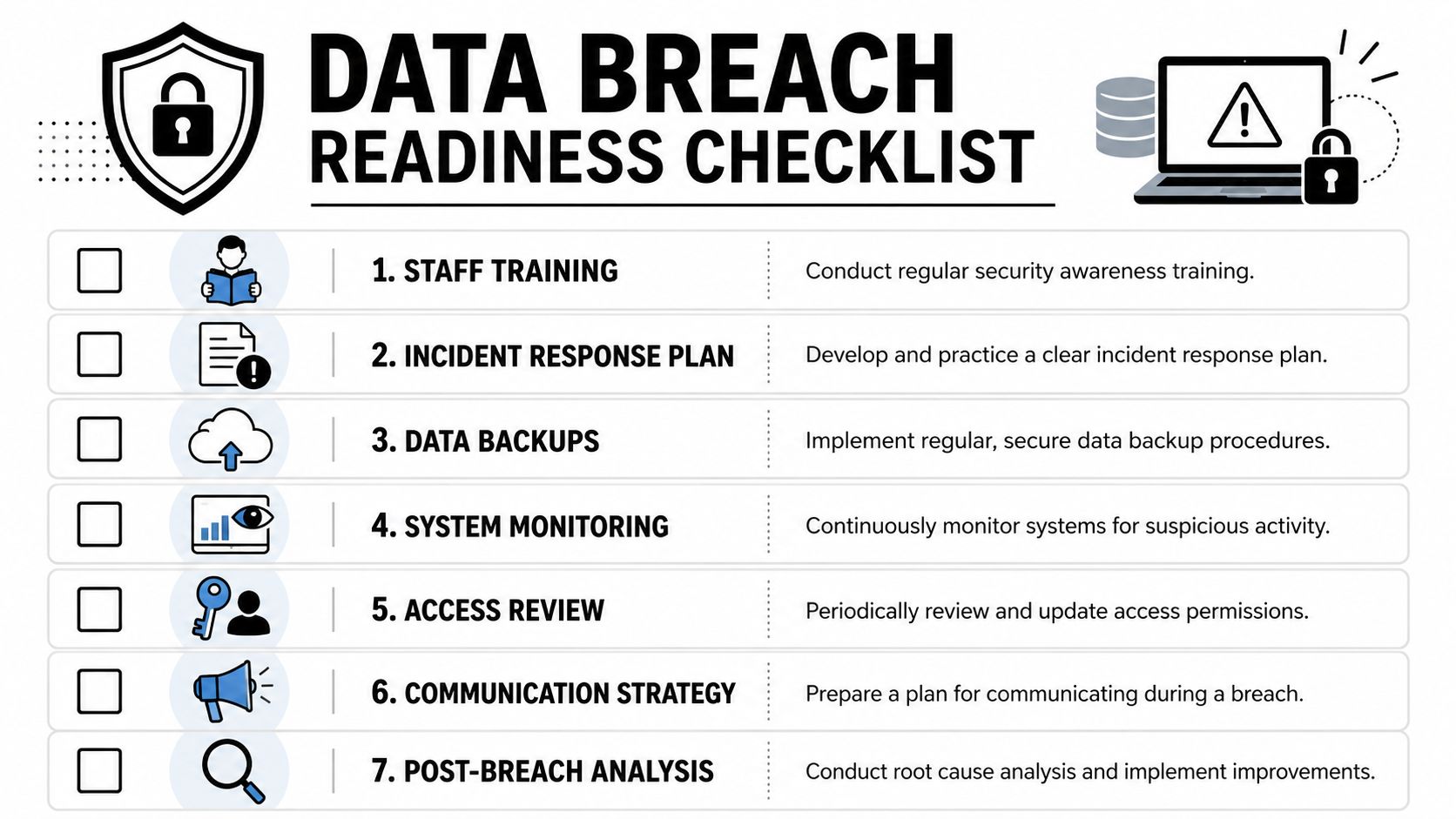
A simple visual checklist helps anchor expectations in daily work.
Training changes risk faster than software does
Training has the highest return because it governs dozens of small decisions software can't fully police. Should staff open a client's cloud link from a personal phone? Can a draft report be pasted into a public AI tool for editing? What happens when a client sends trauma details by plain email at midnight?
Those aren't edge cases. They're routine.
The training program should be short, repeated, and tied to real scenarios:
- Client communications. How to redirect sensitive disclosures into approved channels without sounding dismissive.
- Privilege and minimum necessary access. Staff should know the difference between needing awareness of a task and needing access to content.
- Device handling. What to do with downloads, screenshots, printouts, and autofill.
- AI use restrictions. No upload of client narratives, reports, or identifiers into unsanctioned generative AI systems.
- Escalation without fear. Staff must report mistakes immediately. Delay is usually more damaging than the initial error.
Later in the year, reinforce the training with brief drills rather than long lectures.
Build a breach response plan people can actually follow
A breach response plan shouldn't read like a policy manual. It should read like a triage sheet.
When an incident occurs, staff need to know:
- Who receives the first internal report.
- What systems or accounts must be contained immediately.
- Which facts must be captured at once, such as time, device, account, file type, recipients, and whether data was merely exposed or accessed.
- Who assesses legal and ethical notification duties.
- How the office preserves logs, messages, and screenshots for later review.
Use a one-page incident form. Keep it with the same practical accessibility as an emergency contact list.
Report first, analyze second. Staff lose time and create exposure when they try to solve or hide an incident before notifying the responsible lead.
One final warning for law firms and clinical practices alike. Don't build a culture where only the IT person is responsible for privacy. In small teams, everyone touches risk. The attorney who forwards a file, the clinician who works from home, and the coordinator who reschedules a vulnerable client all affect confidentiality. A breach plan works only when the whole office knows their first move.
Documenting Security for Court and USCIS Admissibility
In immigration matters, secure handling has legal value only if you can document it. A report may be clinically sound and legally relevant, yet still draw avoidable scrutiny if the office can't explain how it was collected, transmitted, stored, and protected from unauthorized alteration.
Secure data management integrates with advocacy. You're not just protecting privacy. You're reinforcing the reliability of the evidence.
Build a chain of custody for digital records
Courts are familiar with chain of custody in other contexts. The same logic applies here. A digital report should have a handling history that shows where it originated, who accessed it, how it moved, and which version became the official filing copy.
That doesn't require theatrics. It requires consistency.
For sensitive immigration records, keep a concise data handling declaration in the administrative file. It can identify:
- the system used for intake and consent
- the method of identity verification
- the platform used for remote interview or telehealth session
- where working notes and final reports were stored
- how the final report was transmitted to counsel
- who had authorized access during the matter
- whether any deviations occurred and how they were resolved
This kind of documentation is especially useful when an attorney needs to answer practical questions about the creation and handling of an expert report. For a broader view of what belongs in an evidentiary record, this overview of medical documentation in legal immigration settings provides a helpful parallel.
What to keep in the administrative record
You don't need to preserve every background system log inside the legal file. You do need enough documentation to support reliability if challenged.
A useful division looks like this:
| Record type | Keep in matter file | Keep in admin or compliance file |
|---|---|---|
| signed consent | yes | optionally duplicated |
| identity verification note | yes | no |
| final report version record | yes | no |
| disclosure authorization | yes | no |
| access review logs | no | yes |
| platform configuration records | no | yes |
| incident documentation if relevant to file integrity | yes, if material | yes |
That split respects both relevance and practicality. The matter file should support the attorney's case presentation. The compliance file should support the office's ability to explain its security posture if asked.
Good documentation does two things at once. It protects the client's dignity, and it gives the legal team a clean answer when someone asks, “How do you know this record was handled properly?”
This is also the point where collaboration matters most. The clinician, attorney, and operations lead should align on a common vocabulary for confidentiality, disclosure, version control, and final transmission. When those terms are used consistently, the office presents one coherent story about the record. That coherence helps with credibility. It also reduces the chance that an otherwise strong filing gets sidetracked by avoidable questions about process.
Secure handling won't win a case by itself. But weak handling can undermine one. In immigration practice, where the record often carries a client's most intimate history, the standard should be simple. Protect the file as if privacy, credibility, and admissibility are connected, because they are.
Pro Psychological Analysis partners with immigration attorneys to produce psychological evaluations for asylum, T visa, U visa, VAWA, and hardship matters using HIPAA-secure onboarding and handling practices that fit sensitive legal and clinical workflows. If your firm needs evaluations that are prepared with close attention to confidentiality, documentation integrity, and evidentiary use, visit Pro Psychological Analysis.